Proxenos
Proxenos reads your own mail, chats, calendar, notes and health records into a private folder on
your computer, keeps track of where things stand, and drafts what comes next: the reply, the email with your
CV attached, the call script, the next step on your paper. You read it and press send. It's free and open
source.
Download for Mac and Windows
Proxenos on GitHub
New: the desktop app for Mac and Windows came out on 3 November 2026. A preprint on
Proxenos as a tool is coming soon.
What it doesHow it compares
Can your computer run it?Get Proxenos
Questions
The slide deck
The deck as
a PDF
What it does
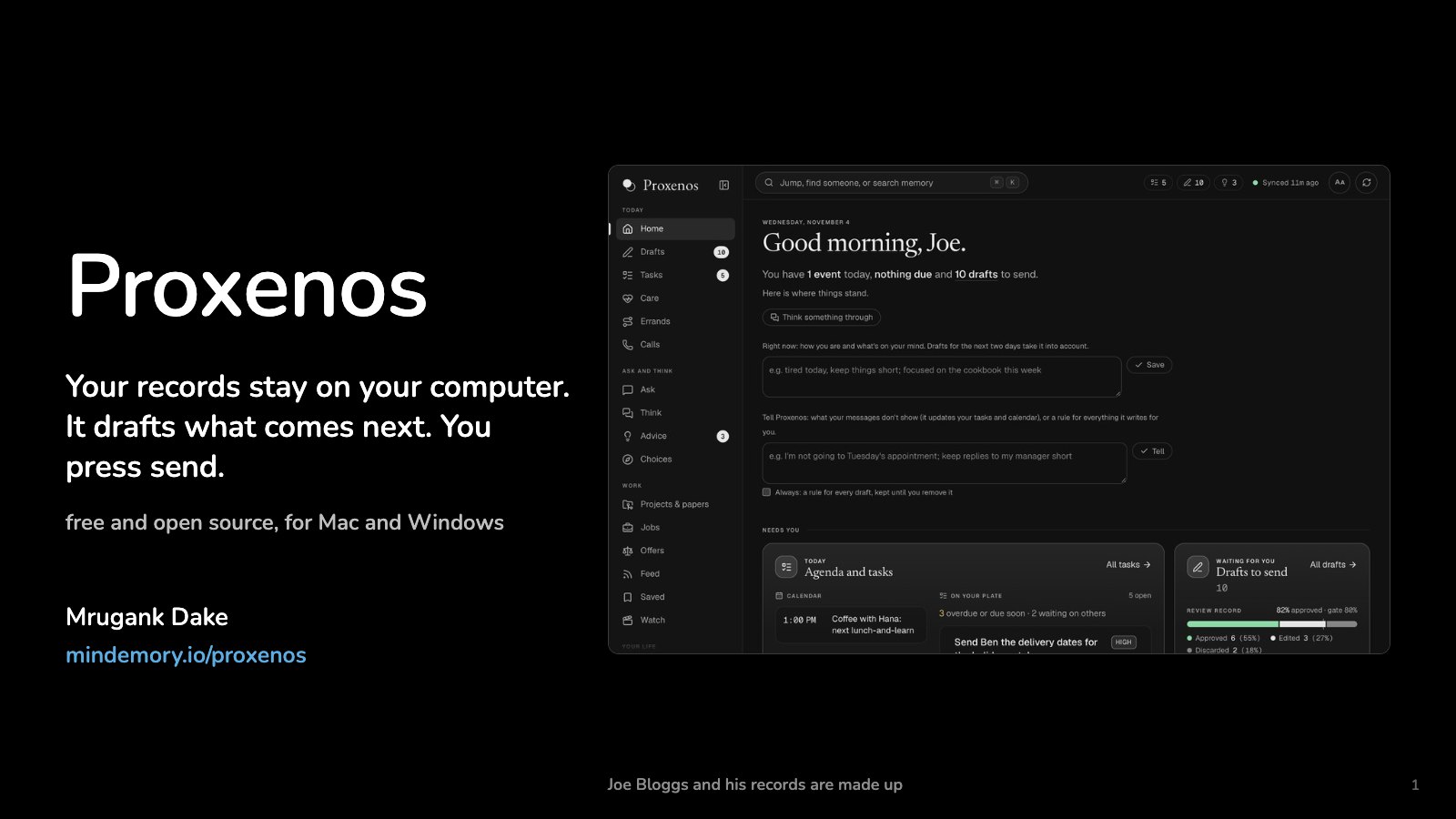
Every picture here is Proxenos running on the made-up life of Joe Bloggs: an operations
manager at a furniture company, with a pottery class on Thursdays, a short paper about getting holiday orders
out on time, and a bill for new glasses that doesn't add up. None of it is real. proxenos demo
gives you Joe to try it on.
Drafts
A reply for each chat that's waiting on you
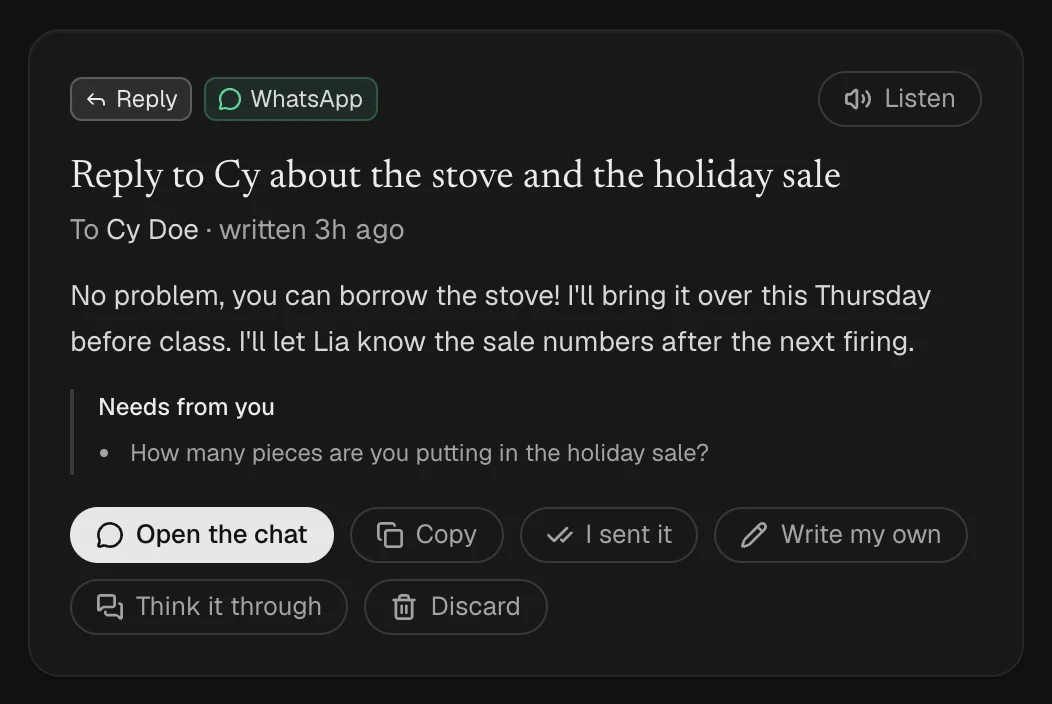
Cy asked on WhatsApp to borrow Joe's camping stove. Proxenos saw that the chat was waiting on Joe and
drafted the reply the way he writes to Cy, from the chat, what it remembers about Cy and what Joe told
it this week. Joe copies it, or opens WhatsApp with it filled in, and sends it himself.
Chats that need no answer get no draft. When Joe changes a draft before sending it, later drafts see
the change, and Proxenos proposes writing rules from his edits for him to accept.
Think
Say what to change, and the draft is rewritten
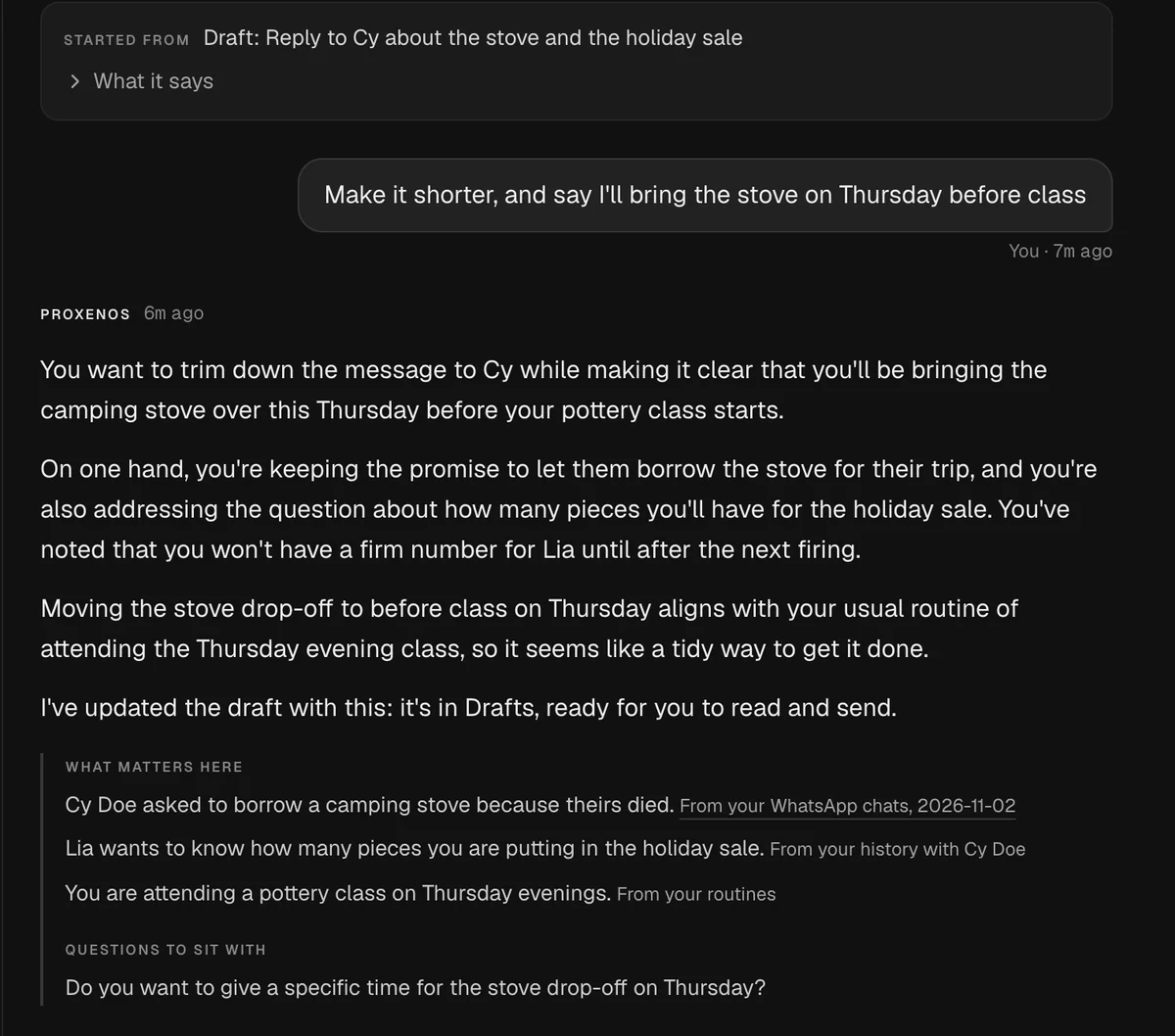
Joe opened that draft in Think and typed “Make it shorter, and say I'll bring the stove on Thursday
before class.” Think knew from his routines that pottery is on Thursday evenings, rewrote the draft and
saved it as his own edit:
No problem, you can borrow the stove! I'll bring it over this Thursday before class. I'll let
Lia know the sale numbers after the next firing.
Think is also where to turn over a decision, a project or a day. Each answer says what Joe's goals,
notes and records have to do with it, and where each point came from. It never decides for him.
Care
The bill says $420. The plan says $95.
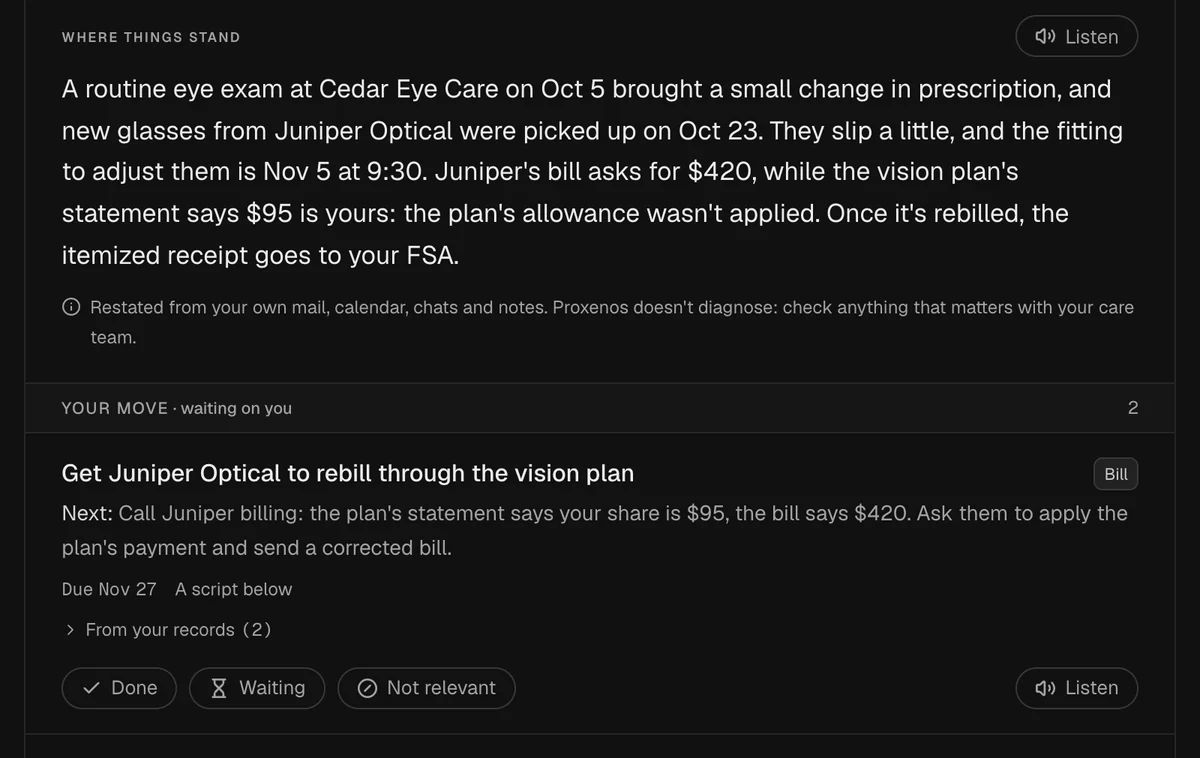
Joe's new glasses came with a bill for $420, while his vision plan's statement says his share is $95.
Care reads the mail, calendar, chats and health records about it and writes where things stand, what's
his to do next, and a script for the call to the optician's billing office. Before an appointment it
writes a one-page brief, with each medical term in plain words.
It restates what his records say. It isn't medical advice.
Offers
Three quotes side by side, and a reply to each
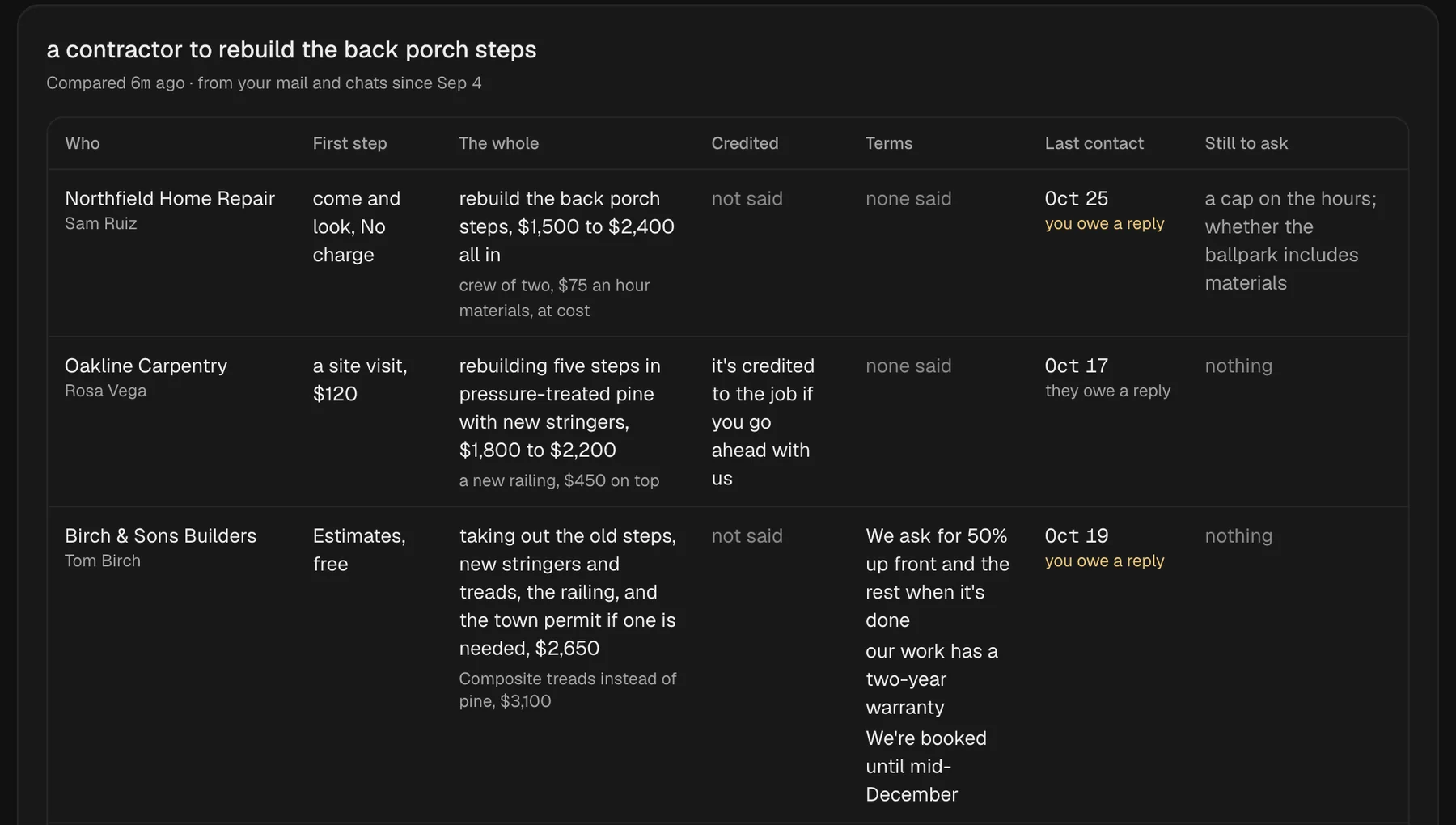
Joe asked three contractors to rebuild his back porch steps. Offers read their emails and lined up
what each offered: the first step and its price, the whole job, what's credited, their terms, and who
owes whom a reply. Every figure is as they wrote it, and one their messages don't hold is dropped. Then
it drafted a reply to each, asking for what's missing, such as a cap on the hours. The replies wait in
Errands for Joe to send.
Errands
Carried as far as it goes, one tap short of Send
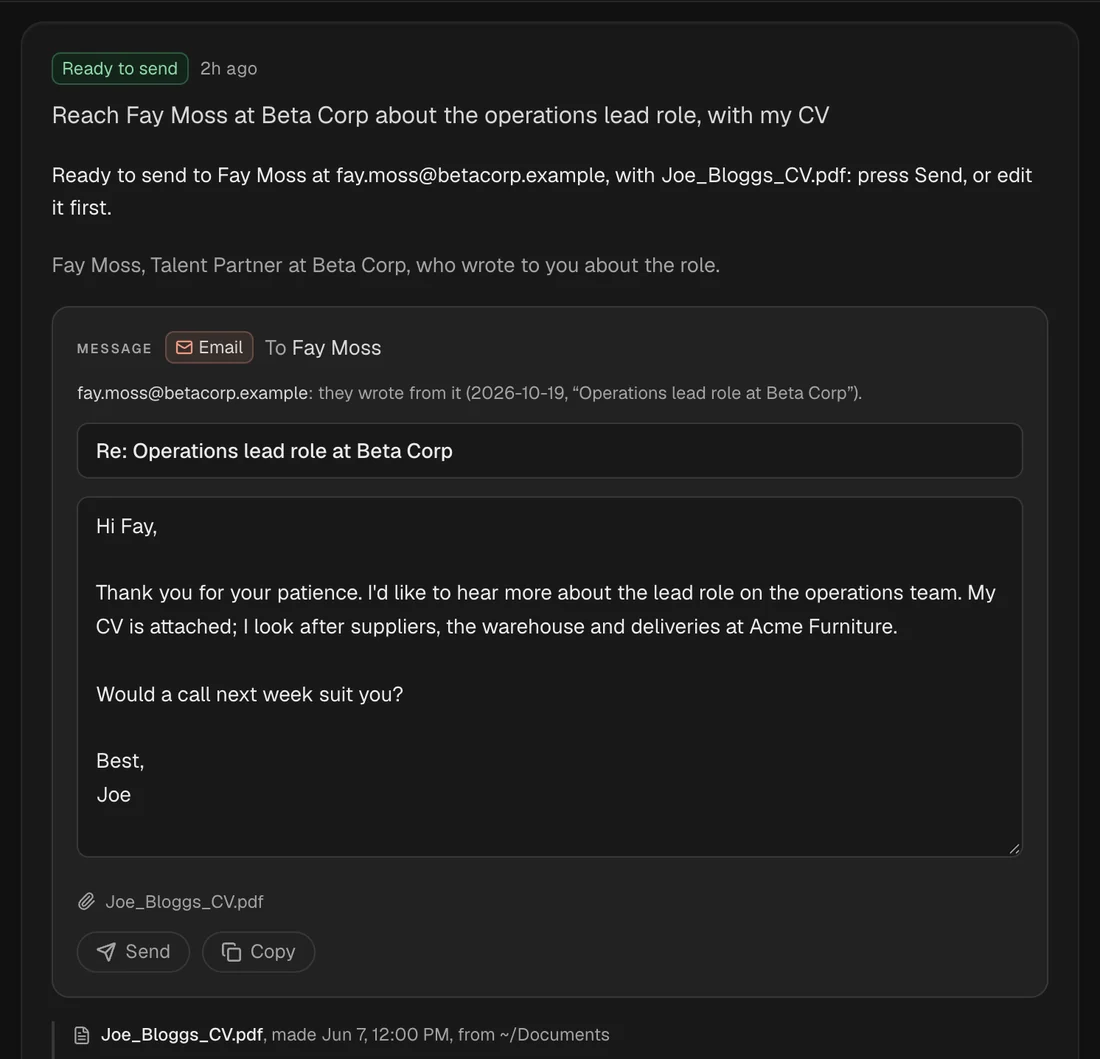
Joe typed “Reach Fay Moss at Beta Corp about the operations lead role, with my CV.” Proxenos found her
address in his mail, attached his newest CV, noticed the CV was out of date, wrote the email the way he
writes these, and stopped before Send, with each step it took listed. When an address isn't in your
records, it looks on the person's organization's own web pages, says which page it found it on, and
never guesses.
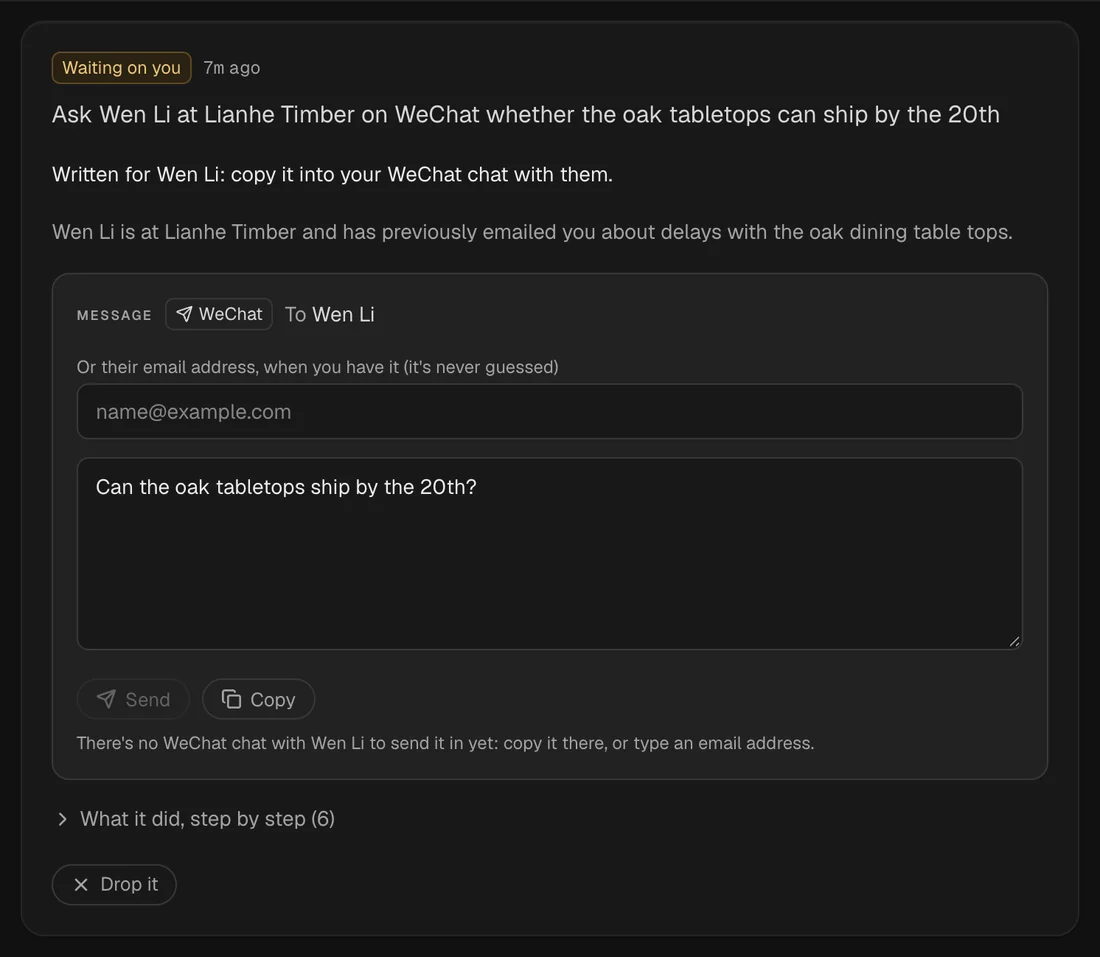
An errand can also be a WeChat message. Joe's oak supplier answers faster there, so the message is
written short, for him to paste into WeChat.
Projects & papers
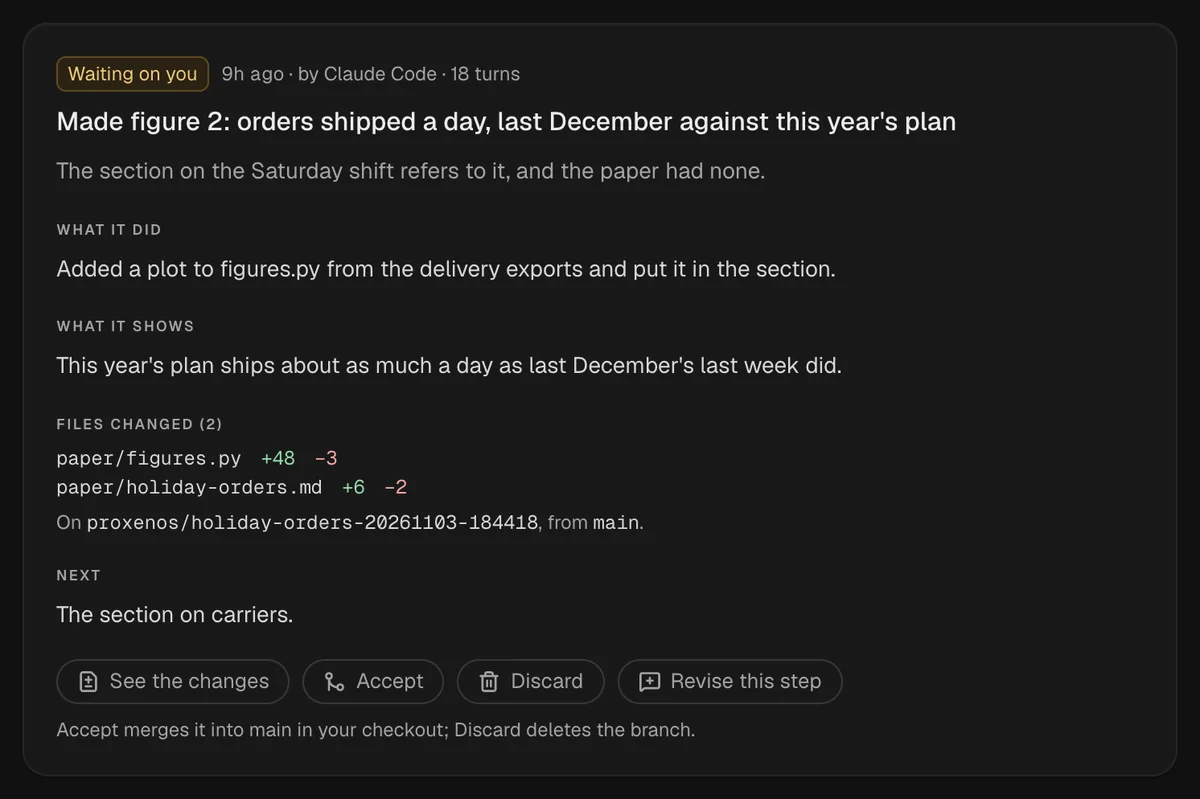
A paper's changes, its next step, and its folder in your Drive
For each long project, Proxenos writes where it stands from the messages about it and the code on
every branch. Given the code, it does the next step on a branch of its own, for Joe to accept or
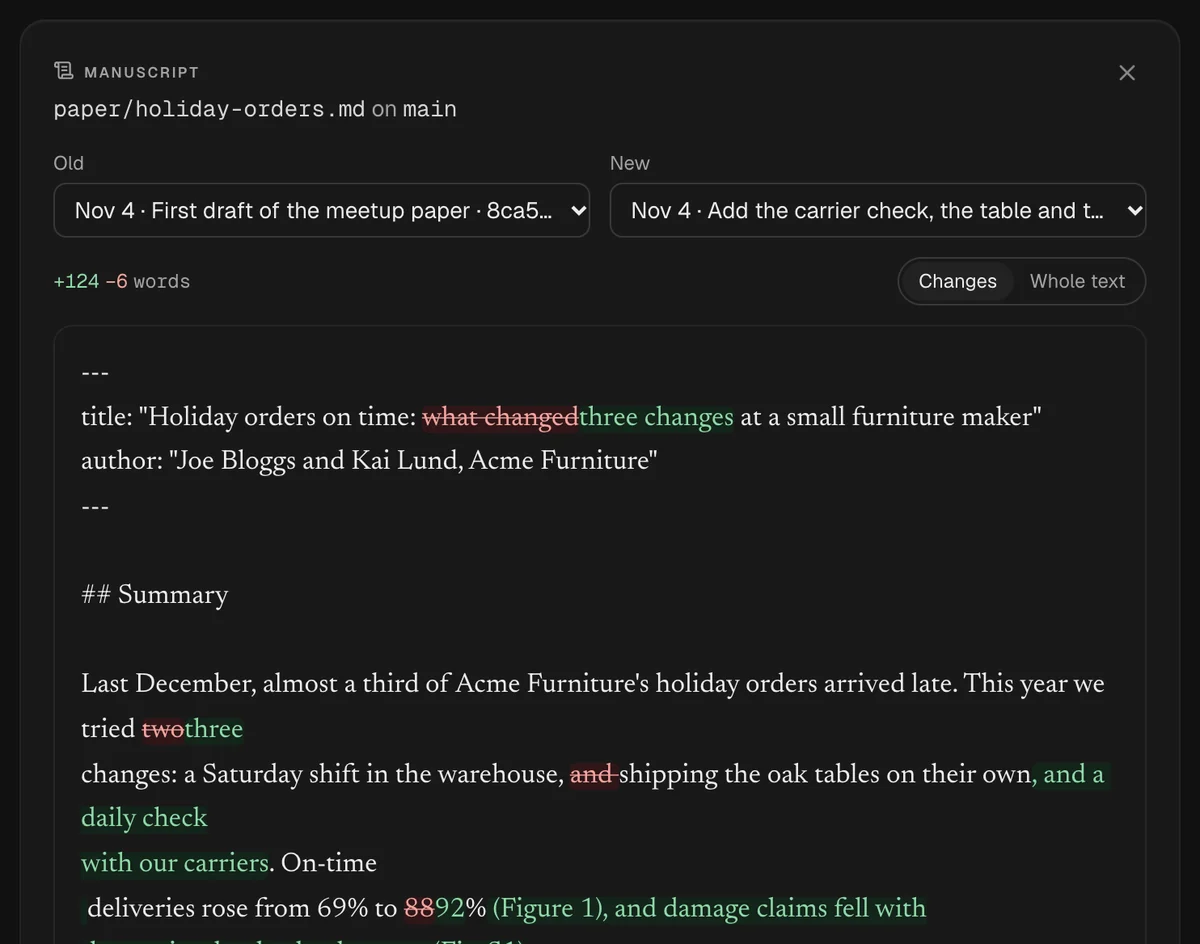
discard. The manuscript's versions are a click away, with the changes marked word by word.
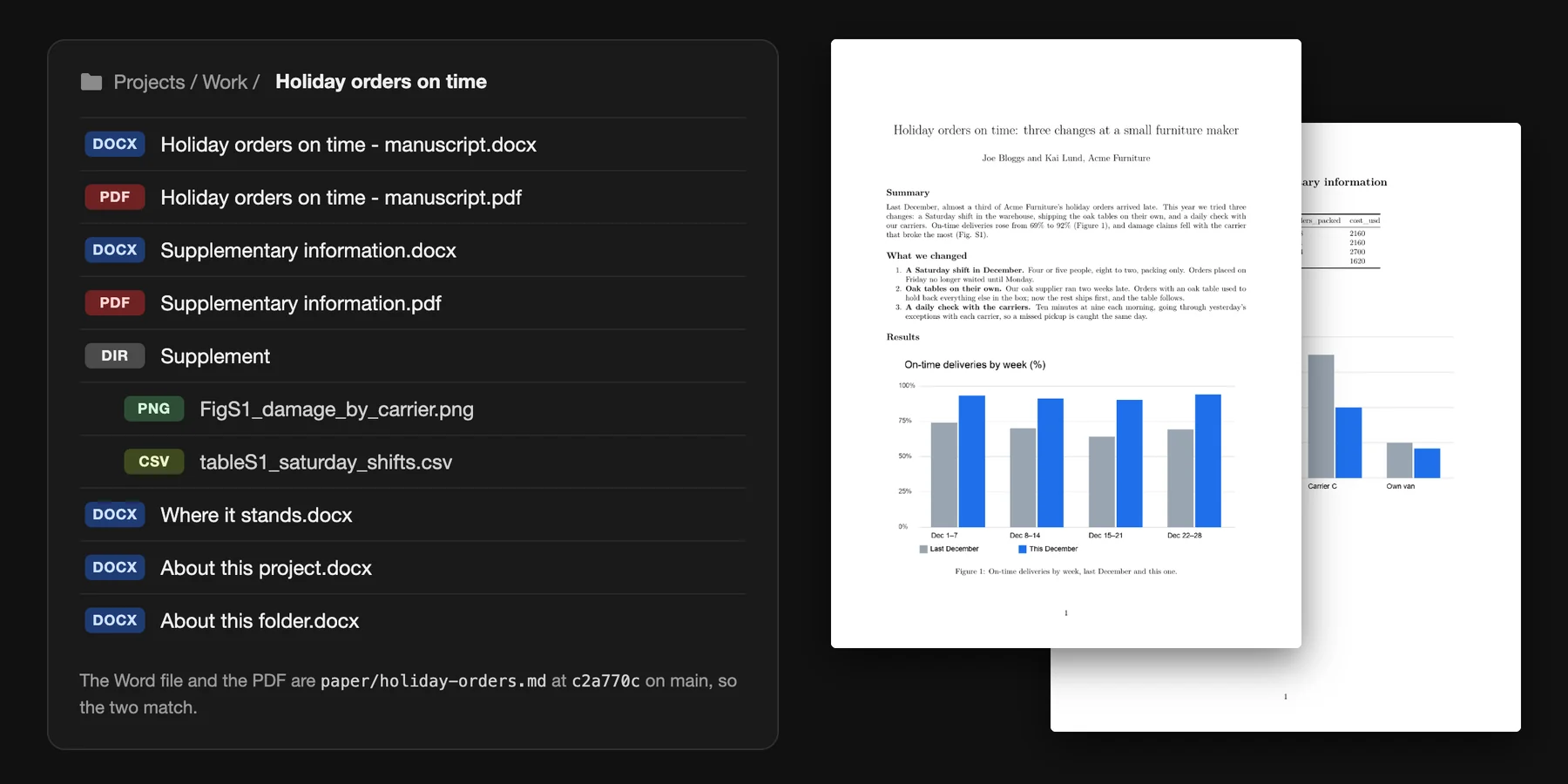
Each night, each project also gets a folder in Google Drive (or Dropbox, OneDrive or iCloud Drive):
the manuscript as a Word file and a PDF made from the same commit, a supplement of the tables and
figures it names, and where things stand. Comments that co-authors leave in Word come back as a step.
Projects can sit in groups, such as “PhD” and “Postdoc”, and carry a brief: what's known, the
question, the first analyses.
Jobs
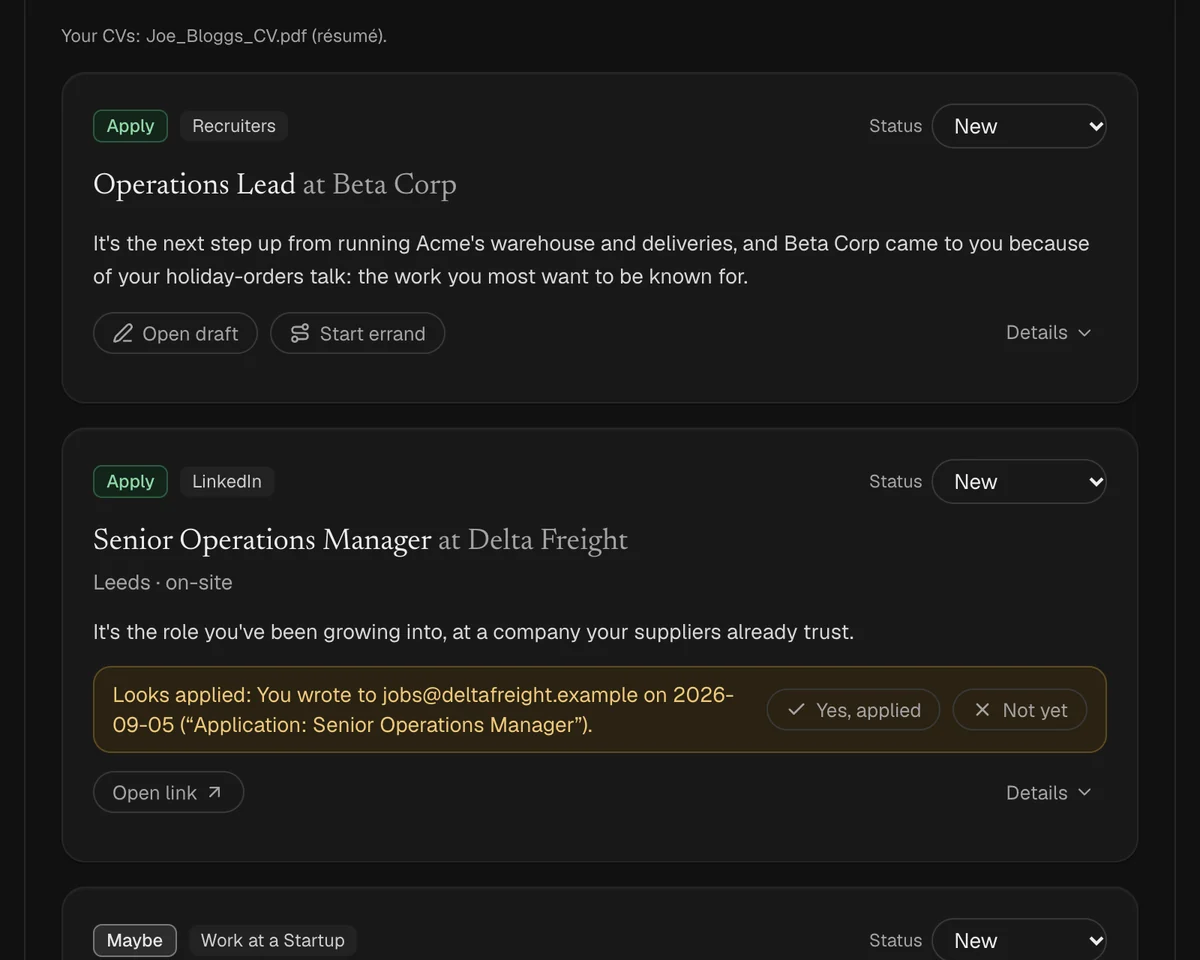
Every job lead, with whether to apply
Leads from LinkedIn's alerts, recruiters' emails, Work at a Startup and job boards, each job once,
however many places it came from: whether to apply and why, the CV that fits, whom to contact and a
first message drafted. It spots the applications already in Joe's sent mail and asks before marking
them applied.
Journal, Life and Rhythms
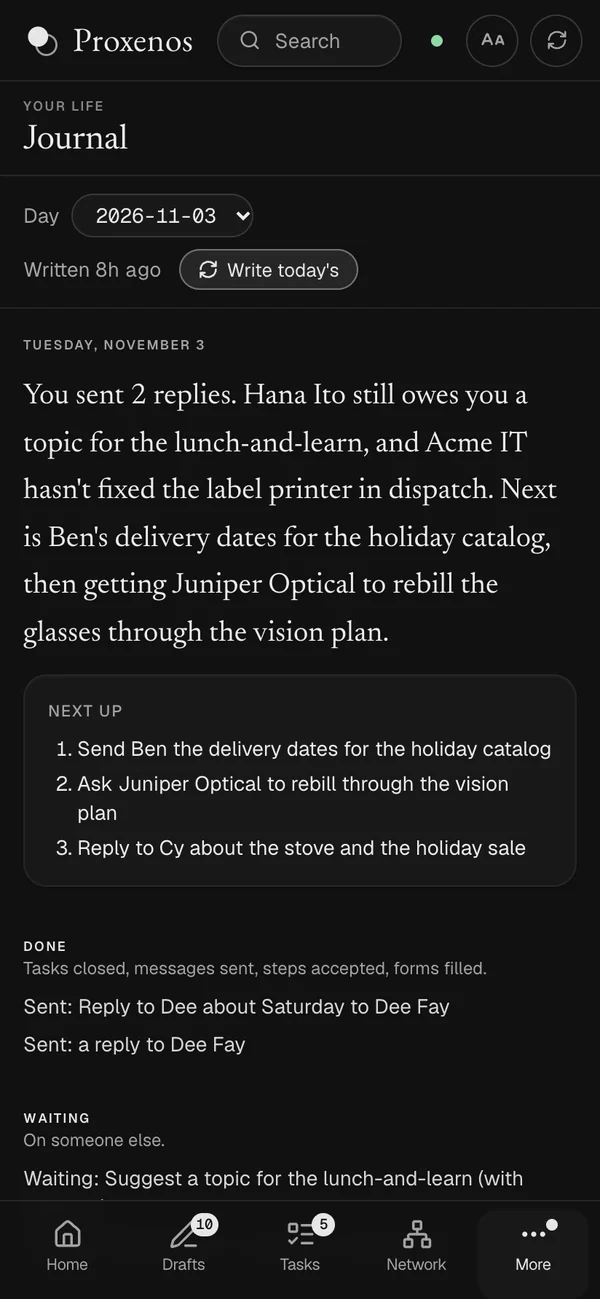
Your days, months and weeks, written down
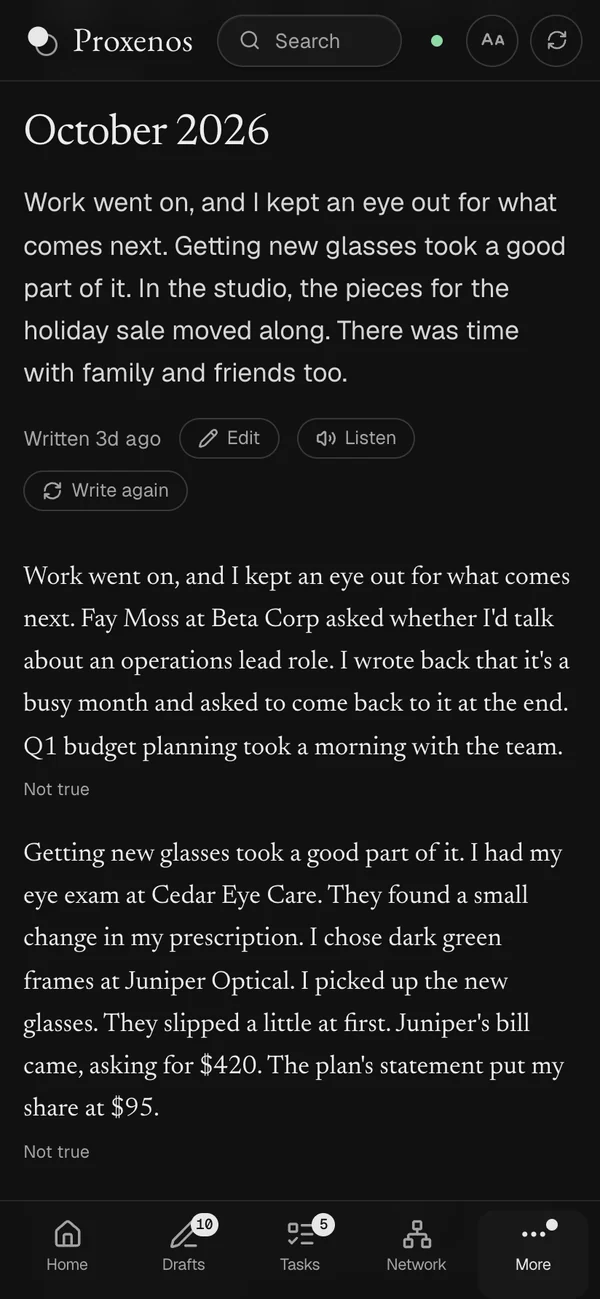
Journal writes each day down: what got done, what's waiting on others, what's next. Life tells each
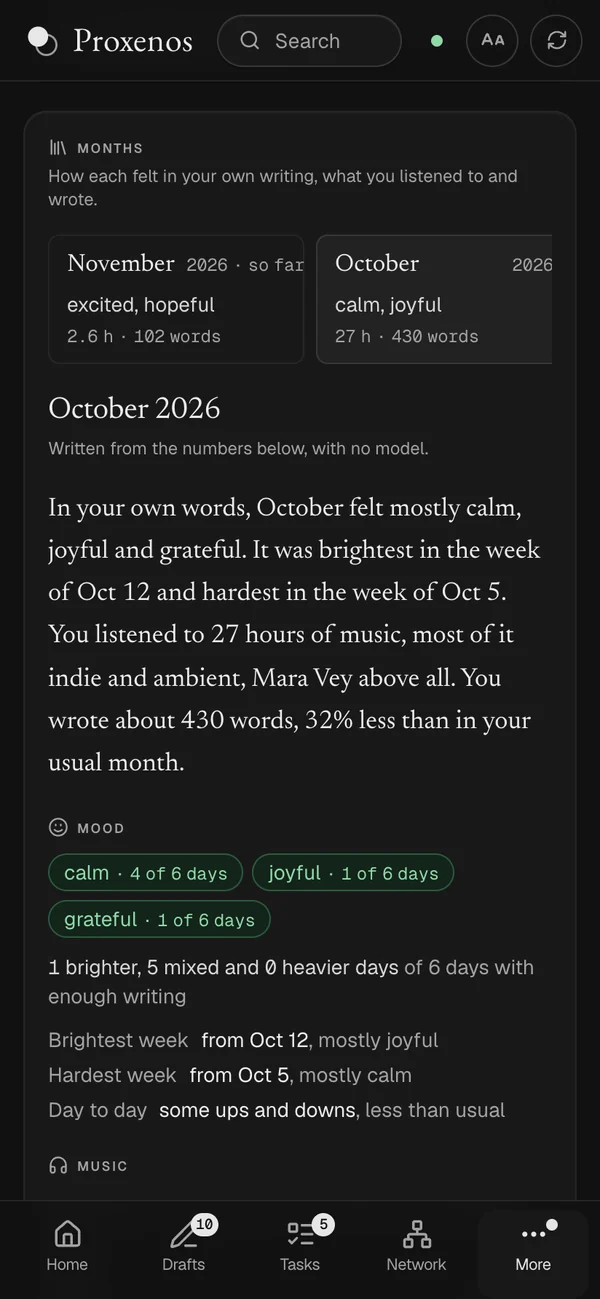
month of Joe's life in his own voice, years back, for him to edit or mark not true. Rhythms sets his
weeks side by side, with listening, rides and messages, and a card on how each month felt, now for
past months too.
Privacy
Every model call, and where it ran
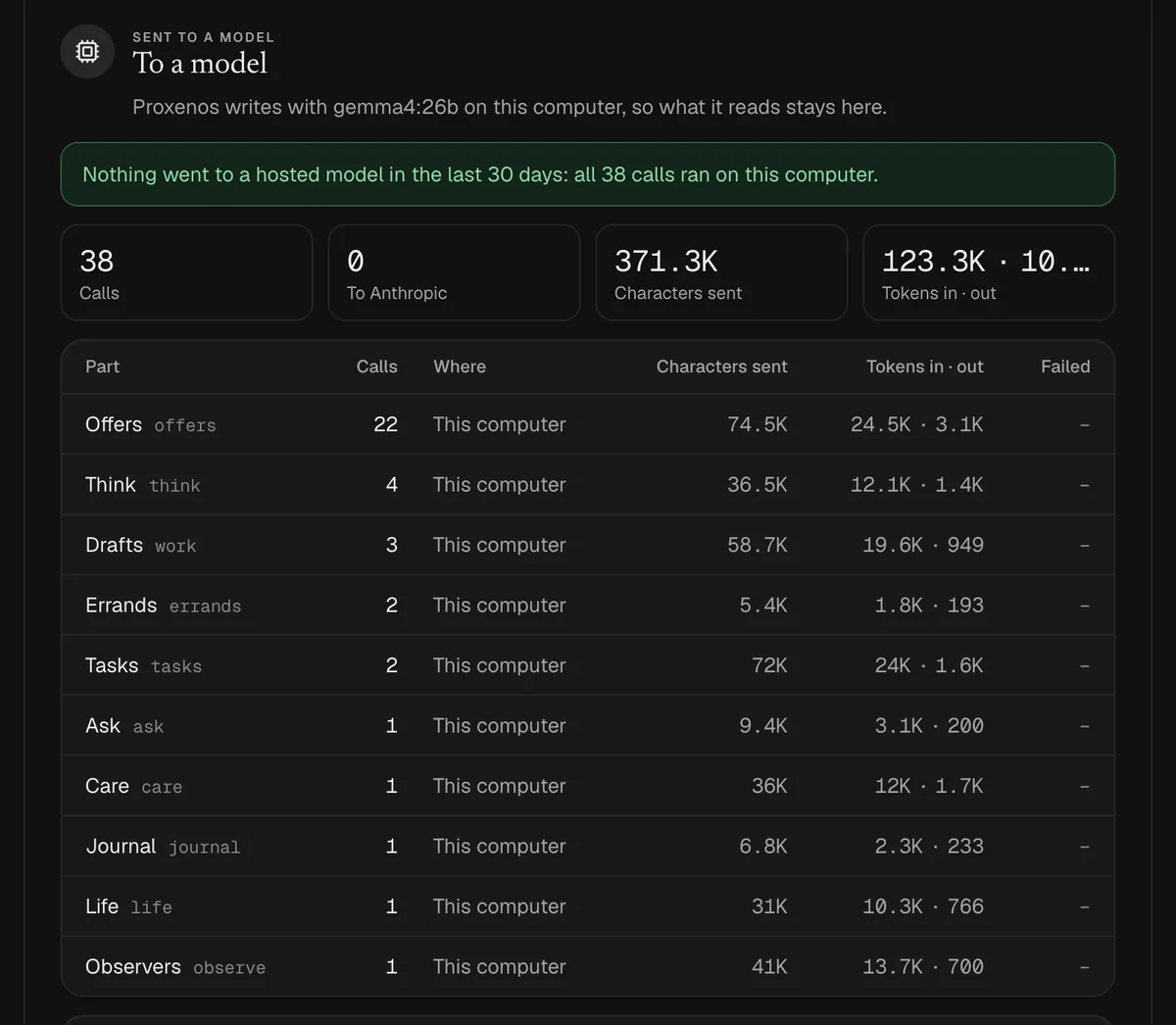
The Privacy view counts the last 30 days of model calls by part: where each ran and how much went in,
never the words. Joe's model runs on his computer, so all of them stayed there.
If you'd rather not wait on a local model, a hosted one (Claude, OpenAI's or Google's Gemini) can
answer what you're waiting on (Ask, Think, errands and calls) under your own key, while the nightly
work stays on your computer.
It also keeps your tasks and puts the plans in them on your calendar; fills a PDF form from your
records, leaving ID numbers, account numbers and the signature to you; places a call you start, waits on
hold and rings you when a person answers, saying it's an automated assistant; reads drafts and Care aloud,
in a natural voice or your own; sets larger text and a typeface made for low vision; works on your phone
over your own Tailscale; and lets you pick, blind, which model writes most like you.
Joe Bloggs, the people he knows and every record in these pictures are made up.
Why I built it
This fall, a health problem put me on the patient side of the system: wait lists, a referral lost in
paperwork, and a lot of phone calls, voicemails and fax machines. What helped most was AI that could draft
the emails, fill out the forms, keep a medical logbook, track the referrals and bills, and explain my
insurance. Proxenos is that help, built so anyone can have it: people getting through the health care system
first, especially those who can't think clearly for long or make a phone call, and anyone with more to keep
up with than time. The longer story is Try anything, but don't fall sick.
In the Greek city-states, a proxenos was the citizen who formally acted on someone else's behalf.
How it compares
Many tools keep a memory for you or act for you. Checked against each project's own pages on 3 November
2026:
| Tool |
Your data lives |
It reads |
Acts or drafts |
A model of you |
Checks how close it comes to you |
| Proxenos (MIT) |
Your computer, in plain files |
Your mail, chats, calendars, notes, documents, health records and exports: about 30 sources |
Drafts; you press send |
A written self-model you read and correct |
Yes: how much of each draft you sent, and blind picks between models |
| Odysseus,
Open WebUI |
Your machine or server |
Files you add, the web; Odysseus also an IMAP inbox and CalDAV calendars |
Acts: agents with tools and MCP |
Memories from your chats |
No |
| Khoj |
Your server, or Khoj's cloud |
Your notes and documents, the web |
Answers, and research on a schedule |
Long-term memories |
No |
| Screenpipe,
Microsoft Recall |
Your computer |
Your screen (Screenpipe: audio and input too) |
Screenpipe: scheduled pipes; Recall: search |
No |
No |
| OpenClaw |
Your computer |
Your chats on WhatsApp, Telegram, Slack, iMessage and more |
Acts on a schedule, with tools |
MEMORY.md and USER.md |
No |
| Mem0,
Letta,
Zep |
Wherever a developer runs it, or the vendor's cloud |
What an app passes it |
No: memory for other agents |
Facts about a user |
Recall on benchmarks, not likeness to a person |
| ChatGPT, Claude, Gemini |
The vendor's cloud |
Your chats, and Gmail, Calendar or Drive once connected |
Acts: tasks and agents, mostly asking first |
Saved memories you can see and edit |
No |
| Second Me,
Personal.ai |
Your computer; Personal.ai's cloud |
Notes, files and posts you give it |
Answers as you |
A model or persona of you |
Partly: a model judges, or a score whose method isn't published |
What others do better: Odysseus and Open WebUI are fuller workspaces, for more
people and more models. OpenClaw reaches you on every chat app, and the hosted assistants need no setup and
keep going while your computer is off. Screenpipe and Recall capture everything on your screen. The memory
frameworks are built for developers at scale, with published benchmarks. Proxenos is young: its measures
come from one person so far, the desktop app isn't signed yet, and some readers expect a particular export
format. The full
table has more tools, their licences and links.
Can your computer run it?
Proxenos itself is light. What needs memory is a model on your computer. Setup reads how much memory you
have and says which models fit.
8 GB
Too little for a model that writes well. Use a hosted one (Claude, OpenAI's or Gemini) under your
own key; each part sends only what it needs.
16 GB
Models of up to about 7 GB, for short drafts and sorting, and a hosted one for the long work if
you like.
32 GB
gemma4:26b, about 17 GB, the model Proxenos is tuned on. Everything stays on your computer. On an M1
Pro it writes about 23 tokens a second.
64 GB or more
Models of up to about 40 GB, with room for everything else.
Your privacy
- Your records stay in a folder on your computer that only you can open, never on a server of mine. Keys go
to your system's own secure store.
- With a model on your computer, no prompt leaves it. With a hosted one (Claude, OpenAI's or Gemini),
under your own key, each part sends only what its job needs, with card numbers, passwords and keys
blanked first.
- A few things go out by design, and the Privacy view says which: a call's audio on a call you start,
counts for phone notices if you turn them on, artists' names to MusicBrainz, a person's name and
organization to a search engine when you need their public email address, and a manuscript to your own
Drive or cloud folder if you set one.
- It never sends, posts or buys anything on its own, never fills an ID number, account number or
signature, and never agrees to pay on a call. You can switch on an outbox per app, only once that app's
drafts have gone out nearly unchanged many times.
Get Proxenos
The desktop app Out now
For a Mac with Apple silicon (macOS 13 or newer) or a Windows PC. No terminal, no code.
- Download the
.dmg (Mac) or the .exe (Windows) from the latest release
below. It's about 320 MB on a Mac.
- On a Mac, open the
.dmg and drag Proxenos into Applications, then open it. It isn't
signed yet, so macOS stops it the first time: press Done, go to System Settings →
Privacy & Security, scroll down, and press Open Anyway. On Windows,
when SmartScreen warns, choose More info → Run anyway.
- Setup asks your name and where to keep your records, then a model. On a Mac, In
Proxenos downloads one with one button (about 5 GB) and runs it inside the app, and
offers a bigger one later if your Mac has the memory. Or use your own key from Anthropic, OpenAI or
Google.
- The last step, Get Proxenos ready, has one button for each thing to connect:
Full Disk Access (so it can read Mail and WhatsApp), Google sign-in, Slack and WhatsApp.
After that, Proxenos lives in the menu bar: Open, Sync now, Pause and Quit, with the sync and the
nightly run built in. Empty pages have a Make it now button.
Download the latest release
From the code, on a Mac
1. Install it
With Homebrew installed, in Terminal:
git clone https://github.com/mindemory/proxenos && cd proxenos && scripts/install.sh
It installs what's missing (Node, Ollama's own app, and Miniforge if there's no conda), sets up the
proxenos environment and pulls a local model that fits your memory: gemma4:26b with 32 GB
or more. --no-model skips the model, to use Claude. Running it again only adds what's
missing. If it installed Miniforge, run conda init zsh once and open a new window.
2. Try it on Joe
conda activate proxenos && proxenos demo
It writes Joe's made-up records to a temporary folder and prints the command that opens his page, at
http://127.0.0.1:4848. No model, none of your data, and nothing is ever sent from it.
3. Open your own
proxenos web
Setup asks your name, where to keep your records (~/proxenos_vault unless you pick
another folder) and a model: one on your computer, which it downloads with one button and checks fits
your memory, or your own key from Anthropic, OpenAI or Google Gemini. Then Connect adds your sources in any order: WhatsApp from its Mac app, every account in the
Mac's Mail and Calendar once Proxenos has Full Disk Access, Gmail, Google Calendar or Microsoft 365 by
signing in, and downloads such as Google Takeout or your health records with
proxenos import. The guide lists all about 30 sources.
4. Keep it current
proxenos schedule
It syncs every 15 minutes and runs the night at 01:30, catching up on waking if the Mac slept.
scripts/install.sh --start-at-login does the same from login, with no window. To reach it
from your phone, put Tailscale on both
and run proxenos phone.
From the code, on Windows
Every change is tested on Windows, but running it there from the code is new, so please
say what breaks. You need
Git,
Python 3.12 (tick “Add python.exe to
PATH”), Node.js 22 or newer, and Ollama for Windows or
a Claude key. In PowerShell:
setx PYTHONUTF8 1
git clone https://github.com/mindemory/proxenos
cd proxenos
pip install -e .
proxenos demo
Run setx once, then the rest in a new window. Mail and calendars come in by signing in to
Gmail, Google Calendar or Microsoft 365, and chats through Beeper Desktop. docs/apps.md starts it at log-on.
Questions
Is it free?
Yes. Proxenos is open source under the MIT licence, with no account and no subscription. A model on
your computer costs nothing to run; a hosted one is billed to your own key by what you use.
Will it send things for me?
No. It drafts, and you press send. The exceptions are yours to start: an outbox you switch on app by
app, and a phone call you place, where it says it's an automated assistant and never agrees to
pay.
Can it use Claude, ChatGPT's models or Gemini?
Yes, with your own key from Anthropic, OpenAI or Google: for everything, or only for what you're
waiting on (Ask, Think, errands and calls) while the nightly work stays on a model on your computer.
A ChatGPT or Gemini subscription doesn't include this; the key is billed by what you use. On Gemini's
free tier Google may use what's sent to improve its products, so use a key with billing on. Before a
prompt goes out, card numbers, passwords and keys are blanked.
Do I need a powerful computer?
No. See Can your computer run it? With less memory, a hosted
model does the writing, and your records still stay on your computer.
How is it different from ChatGPT's memory, or Open WebUI?
ChatGPT's and Claude's memories live on their servers and hold what you've told them in chats. Open
WebUI and Odysseus are workspaces you drive. Proxenos reads your own records on its own, keeps a model
of you that you can read and correct, drafts what's next in your voice, and measures how close its
drafts come to what you sent.
Does it work on Windows?
Yes: the desktop app has a Windows installer, and every change is tested on Windows. A few readers
are Mac-only (Apple Mail, Calendar and the WhatsApp Mac app). On Windows you sign in to Gmail, Google
Calendar or Microsoft 365, and Beeper brings your chats.
Is it medical advice?
No. It organizes your own records and drafts messages. The Care view restates what your records say,
and anything that matters belongs with your care team.
How mature is it?
Young. The desktop app's first release came out on 3 November 2026. One person builds Proxenos and
uses it every day, so its measures come from that one person so far. It's about 98,000 lines of code,
with 1,429 tests run on a Mac and on Windows for every change, and a preprint on it as a tool is coming
soon. Ideas and bug reports are welcome on
GitHub.
Help wanted
If you have medical training (a doctor, nurse, pharmacist, medical student or patient advocate), you know
what's worth tracking and what to ask. That knowledge is what would make Proxenos preventive, not just a way
through the system. Code, ideas and a quick call are all welcome: start with the
good first contributions, or
write to me.
Python
Next.js
Electron
Local models (Ollama)
Claude, OpenAI, Gemini
Open source (MIT)